


Med Standards
4.220.00 Reviews
App Specs
- Version
- 2.1.1
- Updated On
- License
- Free
- Downloads
- 10,000+
- Developer
- KP Apps, LLC
- Categories
- Medical
- Platform
- Android
Screenshots
 Analysis by AppCompare
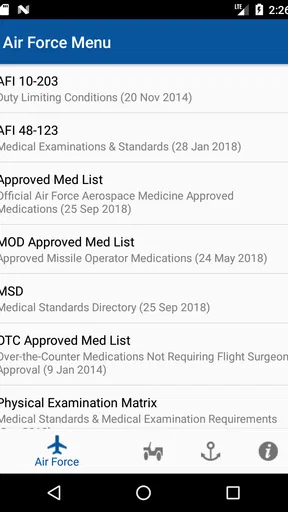
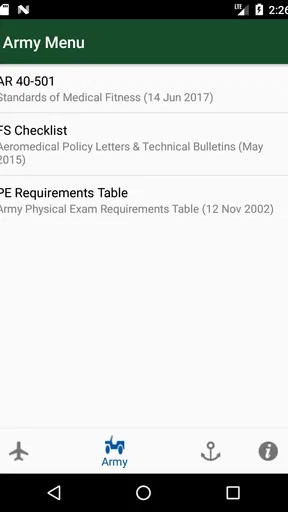
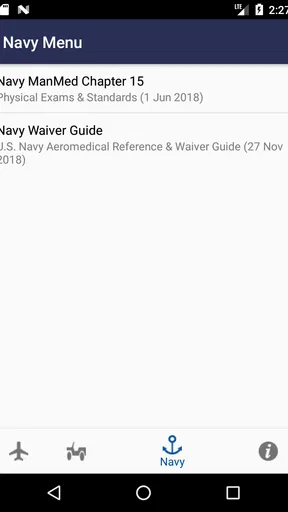
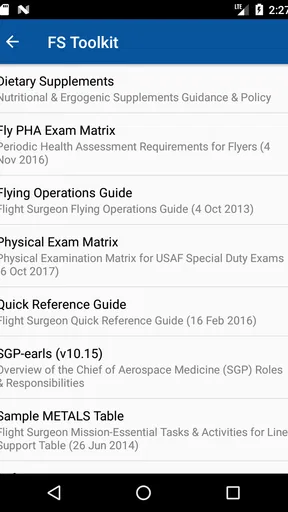
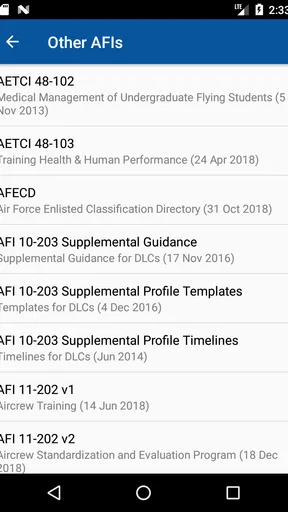
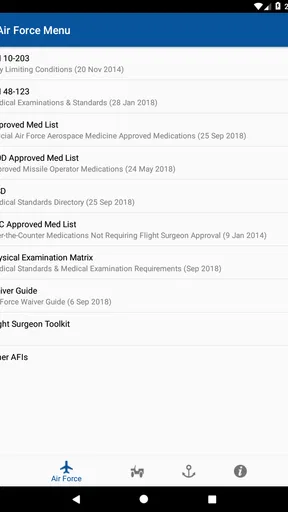
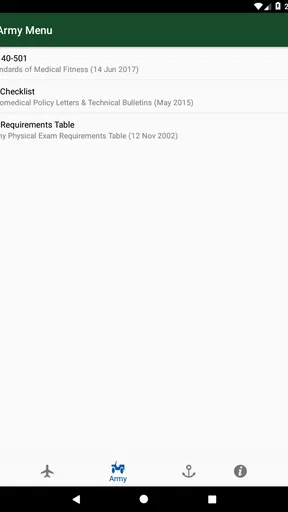
I approached Med Standards as a quick-reference medical app rather than a general health guide. Its purpose is narrow but useful: it brings together medical standards associated with the Army, Navy, and Air Force in a format intended for fast consultation. That focus immediately makes it more practical for some readers than a broad medical encyclopedia, while also making it a poor fit for anyone looking for diagnosis, treatment advice, or a complete personal health record.
In my experience, the main value is not that it replaces professional guidance. The value is that it can help a person locate the relevant standard before asking a more informed question. If you are preparing for a military medical evaluation, reviewing eligibility concerns, supporting someone through an application process, or simply trying to understand the terminology used in military medical discussions, the app gives you a focused place to start.
It is a free medical app from KP Apps, LLC, available for Everyone and currently listed as version 2.1.1. The application has passed ten thousand installs and holds a 4.2 average from 47 ratings, with 20 written reviews. Those numbers suggest a modest but established audience rather than a massive general-health platform. I would treat that as a reason to judge the app by how well it handles its specific reference job, not by the popularity standards of a mainstream fitness or wellness app.
Where people usually get stuck
The first point of friction is knowing what the app is actually for. The short name, “Med Standards,” sounds broad enough to suggest a complete medical reference, but the app is centered on standards for the Army, Navy, and Air Force. That distinction matters. Someone searching for symptom explanations, medication reminders, appointment tracking, or emergency guidance will likely feel lost because those are not the problems this app is designed to solve.
I would also avoid opening it with the expectation that a standard will automatically tell you whether you personally qualify. Military medical decisions can depend on the exact condition, its history, documentation, treatment, current status, and the branch or process involved. A reference entry may help you understand the issue, but it should not be treated as a final determination. Use the app to prepare questions, not to make a medical or enlistment decision on your own.
Another common obstacle is searching with everyday wording. People tend to think in phrases such as “old knee injury,” “asthma as a child,” or “vision problem,” while formal standards may organize related material under more technical categories. If your first search feels unproductive, that does not necessarily mean the information is missing. Try identifying the body system, diagnosis, history, or type of limitation involved, then look for the more formal concept.
This is one reason I would keep a short note beside the app while using it. Write down the exact term you are trying to verify, the branch that concerns you, and whether your question involves a current condition or past history. That small preparation step reduces aimless browsing and makes it easier to compare what you find with your own records.
Worth Reading Before You Choose

EA SPORTS FC Mobile 26 Is a Bigger Football Game, but It Takes Time

Flipboard Shows What News Apps Must Do Beyond the Feed

Switching to Android Auto Means Rethinking Your Driving Routine

Google Calendar Makes a Crowded Week Easier to Manage

Ludo King Makes the Most of the Minutes Between Plans

Baby Panda World Brings Quick Play to Modern Phones, but Its Game Library Feels Busy
The app can also be misunderstood as a substitute for official instructions. I see it as a convenient reference layer, not the final authority. Requirements and interpretations can change, and an individual case may involve details that a compact mobile reference cannot evaluate. If the information affects an application, examination, or treatment decision, confirm the relevant point with the appropriate official or medical professional.
Why the narrow focus can still be helpful
The limited scope is also the app’s strongest practical advantage. A general search engine often returns a mixture of civilian health pages, discussion boards, outdated explanations, and personal anecdotes. That mixture can make an already stressful question harder to understand. A dedicated reference focused on military medical standards gives you a better starting context and helps you avoid confusing general health information with service-related requirements.
For example, imagine that a friend is preparing for a military medical evaluation and has a history of an old injury. Instead of sending them through dozens of unrelated search results, I would use this app to identify the relevant standard category, note the wording that appears important, and then ask the recruiter or medical evaluator what documentation is needed. The app does not finish that process, but it can make the conversation more precise.
Setup checks before relying on a result
Installation should be straightforward for compatible devices because the listed minimum operating system is Android 8.0. Before using it for an important appointment, I would open the app once in a calm setting and make sure the content loads as expected. This is a simple check, but it prevents the first real use from happening in a waiting room, clinic, or examination setting where time and connectivity may be limited.
I would also spend a few minutes learning how the content is arranged instead of immediately searching for a single answer. Check whether the material is separated by branch, topic, or another visible grouping, and notice how you move back to a previous section. This creates a mental map. When you later return under pressure, you will know whether to begin with the Army, Navy, or Air Force material rather than tapping randomly.
Because the app’s subject is sensitive and potentially consequential, confirm that you are reading the correct branch’s material. A phrase that seems relevant in one context should not automatically be carried into another. If your situation involves more than one service or a transfer between processes, keep those contexts separate in your notes.
My preferred setup is deliberately simple. I would make three notes: the condition or history being checked, the exact section or wording that appears relevant, and the question that remains unanswered. This turns the app from a passive reading tool into a preparation aid. It also helps prevent a familiar problem with reference apps: remembering the general idea but forgetting the precise detail that prompted the concern.
There is another useful check that many people skip: compare the app’s wording with the date and source of the instructions you are being asked to follow. I am not suggesting that the app is unusable; I am saying that a reference should be placed in context before it is used for a current decision. If an official office gives you a newer document or a specific form, that material should guide the next step.
How I would use it during a real preparation session
I would begin with the broadest accurate description of the issue, then narrow it down. For a past medical condition, I would distinguish between diagnosis, treatment, symptoms, surgery, and current limitations. For an injury, I would separate the original event from the present ability to perform activities. For a vision or hearing concern, I would record the actual information from a professional examination rather than relying on memory.
That approach matters because standards often depend on details people leave out when searching casually. “I had surgery” is less useful than knowing the body area, approximate history, current status, and whether there are ongoing restrictions. The app can help you locate relevant language, but it cannot fill in personal facts that you have not gathered.
I would not use a single promising sentence as proof that everything is acceptable. Read the surrounding material and note exceptions, conditions, or references to documentation. A quick scan may be enough to find a topic, but it is not enough to interpret a complicated personal history responsibly.
Recovering when the workflow breaks
If you open the app and cannot find what you need, first return to the main navigation rather than repeatedly refining the same vague search. Start again with a broader term, then narrow it. This is often faster than assuming the app has failed. A reference tool can appear unhelpful simply because the user is searching with a phrase that does not match the organization of the material.
If the app closes, freezes, or behaves unexpectedly, I would use ordinary, low-risk troubleshooting: close and reopen it, restart the phone, and check whether the device meets the Android 8.0 minimum requirement. I would also avoid making a critical decision from a partial screen or remembered fragment. If the app is still unreliable, switch to the official channel or professional contact needed for the situation rather than delaying an important appointment.
When a result seems contradictory, do not immediately assume that one line is wrong. Check whether you have moved between branches, topics, or different types of medical history. Write down the exact passages that appear inconsistent and ask a qualified person to interpret them. This is a better recovery method than choosing whichever sentence produces the answer you hoped for.
A particularly useful habit is to preserve the question, not just the answer. For instance, instead of writing “accepted” or “not accepted,” write “Does this standard apply to a past condition with no current symptoms, and what records are required?” That wording acknowledges the part the app can clarify and the part that needs an official decision.
If you are using the app with another person, let them read the relevant section directly rather than summarizing it from memory. Military medical terminology can be easy to simplify incorrectly. Showing the exact wording gives a recruiter, clinician, or applicant something concrete to discuss and reduces the risk of an accidental interpretation.
When a different tool is better
Med Standards is not the right choice for urgent symptoms. It is not an emergency service, and I would never open it instead of contacting emergency help when someone may be in immediate danger. It is also not the best tool for tracking prescriptions, recording blood pressure, managing appointments, or learning about everyday wellness. A dedicated health-management app or a clinician is better suited to those tasks.
It may also be a poor fit if your question is about a highly personal case and you need an immediate, definitive answer. A compact reference can give useful background, but a medical professional or official evaluator can consider records, examinations, and context. If you already have an appointment scheduled, I would use the app to prepare a concise list of questions rather than trying to resolve the case independently.
People who dislike technical reference material may find the experience dry. This is not a polished coaching app that guides you through a friendly questionnaire. Its usefulness depends on your willingness to read carefully, compare terminology, and follow up. For me, that trade-off is acceptable because a focused reference is often more useful than a cheerful interface that hides the important qualifications.
When the app is not the cause
Sometimes frustration comes from the situation rather than the software. Military medical standards can be difficult because the underlying process is difficult. A person may be worried about an old diagnosis, uncertain about paperwork, or trying to understand language that was written for professional review. No app can remove that uncertainty completely.
If the app points you toward a concern, that does not mean the app has diagnosed you or rejected your application. It may simply have helped you notice a topic that deserves clarification. Likewise, if you do not find a condition immediately, that does not prove it is irrelevant. Search terms, branch context, and the details of your history all affect what you should investigate next.
Device issues can create a similar false impression. A slow phone, an outdated operating system, interrupted loading, or an accidental navigation step may make the content appear incomplete. That is why I recommend testing the app before an important use and keeping an alternative way to contact the relevant authority. The goal is not to build dependence on one mobile tool; it is to use it sensibly within a larger process.
Privacy is another reason to be cautious in everyday use. I would avoid entering unnecessary personal medical details into any reference app, especially when a simple note on paper or in a trusted personal system is enough. Use the app to consult standards, and keep sensitive records under your own control unless a qualified professional specifically needs them.
My practical verdict after using it as a reference
I recommend Med Standards to readers who need a focused starting point for Army, Navy, and Air Force medical standards and are comfortable treating mobile information as preparation rather than a final ruling. Its free price removes the main barrier to trying it, and its narrow purpose makes it easier to choose than a broad medical app when the question is specifically related to military eligibility or evaluation.
The app works best when you approach it with a clear workflow: identify the branch, describe the medical issue accurately, search using formal as well as everyday terms, read the surrounding context, and turn uncertainty into a question for an official or medical professional. That method gives the app a practical role without asking it to do something it cannot safely do.
I would skip it if you want symptom diagnosis, urgent advice, personal treatment planning, or a complete health-management system. I would also avoid relying on it alone for a high-stakes eligibility decision. In those situations, the usual alternatives—professional care, official guidance, and current documentation—are more appropriate.
For the right reader, though, this is a useful pocket reference with a sensible purpose. Its 4.2 average and growing audience indicate that it has found a place among people looking for this kind of material, while its version 2.1.1 release gives users a clear current build to evaluate. My final view is simple: Med Standards is most valuable as a question-preparation tool. Use it to understand the landscape, organize your records, and speak more clearly with the person who has authority to give the final answer.
Pros
- Quick access to commonly used medical reference standards.
- Clear organization makes topics easy to locate.
- Useful for students
- clinicians
- and healthcare trainees.
- Helpful reference when working without an internet connection.
- Compact format is convenient for use during clinical practice.
Cons
- Content may not replace official clinical guidelines or local protocols.
- Some standards may vary by country or healthcare institution.
- Medical information should be checked for updates regularly.
- The interface may feel basic compared with modern medical apps.
- Advanced search and customization options may be limited.
FAQs for Med Standards
What is Med Standards, and who is it designed for?
Med Standards is a medical reference app intended to help healthcare professionals and students quickly consult clinical standards, guidelines, protocols, and related medical information. It can be useful during study, preparation, or routine professional work, but it should be treated as a reference tool rather than a replacement for clinical training, professional judgment, institutional policies, or advice from a qualified healthcare provider.
What type of medical information can I find in Med Standards?
The app generally focuses on organized medical standards and clinical reference material, which may include recommendations, diagnostic approaches, treatment guidance, and professional protocols. The exact topics and depth can vary depending on the app version, region, and available content. Before relying on any entry, users should check its publication date, source, specialty, and whether it applies to their country or healthcare system.
Can Med Standards be used to diagnose or treat patients?
Med Standards should not be used as the sole basis for diagnosing a condition, selecting medication, changing a treatment plan, or making an urgent medical decision. Medical recommendations can depend on a patient’s history, examination, laboratory results, local regulations, and current evidence. Use the app as a supporting reference and confirm important decisions with qualified professionals and official clinical guidance.
Does Med Standards require an internet connection?
Whether an internet connection is required depends on how the app stores and updates its reference material. Some sections may be available offline after installation or synchronization, while newer documents, searches, account features, or content updates may require mobile data or Wi-Fi. Users should test access before entering a clinical setting and review the app’s update behavior to avoid relying on outdated information.
Is the information in Med Standards regularly updated and suitable for every country?
Medical standards can change as research, regulations, and professional recommendations evolve, so users should verify how frequently Med Standards updates its content and identify the organizations or sources behind each document. Guidelines may also differ between countries, hospitals, and specialties. Always compare the app’s information with current official recommendations and local protocols before applying it in practice.


